Using LangChain with Gram-hosted MCP servers
LangChain and LangGraph support MCP servers through the langchain-mcp-adapters library, which allows you to give your LangChain agents and LangGraph workflows direct access to your tools and infrastructure by connecting to Gram-hosted MCP servers.
This guide demonstrates how to connect LangChain to a Gram-hosted MCP server using an example Push Advisor API . You’ll learn how to create an MCP server from an OpenAPI document, set up the connection, configure authentication, and use natural language to query the example API.
Find the full code and OpenAPI document in the Push Advisor API repository .
Prerequisites
You’ll need:
- A Gram account
- An OpenAI API key or Anthropic API key
- A Python environment set up on your machine (using Python 3.9 or a more recent version)
- Basic familiarity with Python and making API requests
Creating a Gram MCP server
If you already have a Gram MCP server configured, you can skip to connecting LangChain to your Gram-hosted MCP server. For an in-depth guide to how Gram works and to creating a Gram-hosted MCP server, check out our introduction to Gram.
Setting up a new Gram project
In the Gram dashboard , click New Project to start the guided setup flow for creating a toolset and MCP server.
When prompted, upload the Push Advisor OpenAPI document .
Follow the steps to configure a toolset and publish an MCP server. At the end of the setup, you’ll have a Gram-hosted MCP server ready to use.
For this guide, we’ll use the public server URL https://app.getgram.ai/mcp/canipushtoprod
For authenticated servers, you’ll need an API key. Generate an API key in the Settings tab.
Connecting LangChain to your Gram-hosted MCP server
LangChain supports MCP servers through the langchain-mcp-adapters library using the MultiServerMCPClient class. Here’s how to connect to your Gram-hosted MCP server:
Installation
First, install the required packages:
pip install langchain-mcp-adapters langchain-openai python-dotenv langgraph-prebuilt
# or for Anthropic
# pip install langchain-mcp-adapters langchain-anthropic python-dotenv langgraph-prebuilt
Environment setup
Set up your environment variables by creating a .env file:
OPENAI_API_KEY=your-openai-api-key-here
ANTHROPIC_API_KEY=your-anthropic-api-key-here  # If using Anthropic
GRAM_API_KEY=your-gram-api-key-here  # For authenticated servers
Load these in your Python code:
from dotenv import load_dotenv
load_dotenv()
To run the async code given in the sections to follow, you can import asyncio and wrap the code in an async function as shown below:
import asyncio

async def main():
    # wrap async code
    # ................

asyncio.run(main())
Basic connection (public server)
Here’s a basic example using a public Gram MCP server with Streamable HTTP transport:
from langchain_mcp_adapters.client import MultiServerMCPClient
from langgraph.prebuilt import create_react_agent
from langchain_openai import ChatOpenAI

# Create an MCP client connected to your Gram server
client = MultiServerMCPClient(
    {
        "gram-pushadvisor": {
            "url": "https://app.getgram.ai/mcp/canipushtoprod",
            "transport": "streamable_http",
        }
    }
)

# Get tools from the MCP server
tools = await client.get_tools()

# Create an agent with the MCP tools
agent = create_react_agent(
    ChatOpenAI(model="gpt-4-turbo"),
    tools
)

# Use the agent
response = await agent.ainvoke(
    {"messages": [{"role": "user", "content": "What's the vibe today?"}]}
)

print(response["messages"][-1].content)
Authenticated connection
For authenticated Gram MCP servers, include your Gram API key in the headers:
import os
from langchain_mcp_adapters.client import MultiServerMCPClient
from langgraph.prebuilt import create_react_agent
from langchain_anthropic import ChatAnthropic

GRAM_API_KEY = os.getenv("GRAM_API_KEY")

if not GRAM_API_KEY:
    raise ValueError("Missing GRAM_API_KEY environment variable")

# Create an authenticated MCP client
client = MultiServerMCPClient(
    {
        "gram-pushadvisor": {
            "url": "https://app.getgram.ai/mcp/canipushtoprod",
            "transport": "streamable_http",
            "headers": {
                "Authorization": f"Bearer {GRAM_API_KEY}"
            }
        }
    }
)

# Get tools from the MCP server
tools = await client.get_tools()

# Create an agent with Claude
agent = create_react_agent(
    ChatAnthropic(model="claude-3-5-sonnet-20241022"),
    tools
)

# Use the agent
response = await agent.ainvoke(
    {"messages": [{"role": "user", "content": "Can I push to production today?"}]}
)

print(response["messages"][-1].content)
Understanding the configuration
Here’s what each parameter in the MultiServerMCPClient configuration does:
- The server key (for example,
"gram-pushadvisor") provides a unique identifier for your MCP server. urladds your Gram-hosted MCP server URL.transport: "streamable_http"specifies HTTP-based communication for remote servers.headersadds optional HTTP headers for authentication.
Using MCP tools in LangGraph workflows
LangChain MCP tools work smoothly with LangGraph workflows using the ToolNode:
from langchain_mcp_adapters.client import MultiServerMCPClient
from langchain_openai import ChatOpenAI
from langgraph.graph import StateGraph, MessagesState, START, END
from langgraph.prebuilt import ToolNode

# Set up MCP client
client = MultiServerMCPClient(
    {
        "gram-pushadvisor": {
            "url": "https://app.getgram.ai/mcp/canipushtoprod",
            "transport": "streamable_http",
        }
    }
)

# Get tools from the MCP server
tools = await client.get_tools()

# Initialize the model and bind tools
model = ChatOpenAI(model="gpt-4-turbo")
model_with_tools = model.bind_tools(tools)

# Create ToolNode with MCP tools
tool_node = ToolNode(tools)

def should_continue(state: MessagesState):
    messages = state["messages"]
    last_message = messages[-1]
    if last_message.tool_calls:
        return "tools"
    return END

async def call_model(state: MessagesState):
    messages = state["messages"]
    response = await model_with_tools.ainvoke(messages)
    return {"messages": [response]}

# Build the graph
builder = StateGraph(MessagesState)
builder.add_node("call_model", call_model)
builder.add_node("tools", tool_node)

builder.add_edge(START, "call_model")
builder.add_conditional_edges(
    "call_model",
    should_continue,
)
builder.add_edge("tools", "call_model")

# Compile the graph
graph = builder.compile()

# Use the workflow
response = await graph.ainvoke(
    {"messages": [{"role": "user", "content": "Can I push to production today?"}]}
)

print(response["messages"][-1].content)
Connecting to multiple MCP servers
LangChain’s MultiServerMCPClient allows you to connect to multiple MCP servers simultaneously:
from langchain_mcp_adapters.client import MultiServerMCPClient
from langgraph.prebuilt import create_react_agent

client = MultiServerMCPClient(
    {
        "gram-pushadvisor": {
            "url": "https://app.getgram.ai/mcp/canipushtoprod",
            "transport": "streamable_http",
        },
        "gram-weatherbot": {
            "url": "https://app.getgram.ai/mcp/weatherbot",
            "transport": "streamable_http",
            "headers": {
                "Authorization": f"Bearer {GRAM_API_KEY}"
            }
        },
        # Add more servers as needed
    }
)

# Get tools from all servers
tools = await client.get_tools()

# Create an agent with tools from multiple servers
agent = create_react_agent(
    ChatOpenAI(model="gpt-4-turbo"),
    tools
)

# The agent can now use tools from both servers
response = await agent.ainvoke(
    {"messages": [
        {"role": "user", "content": "Can I deploy today and what's the weather?"}
    ]}
)
Error handling
Proper error handling ensures your application gracefully handles connection issues:
from langchain_mcp_adapters.client import MultiServerMCPClient
from langgraph.prebuilt import create_react_agent
import asyncio

async def create_mcp_agent():
    try:
        # Attempt to connect to MCP server
        client = MultiServerMCPClient(
            {
                "gram-pushadvisor": {
                    "url": "https://app.getgram.ai/mcp/canipushtoprod",
                    "transport": "streamable_http",
                    "headers": {
                        "Authorization": f"Bearer {GRAM_API_KEY}"
                    }
                }
            }
        )

        tools = await client.get_tools()

        if not tools:
            print("Warning: No tools available from MCP server")
            return None

        agent = create_react_agent(
            ChatOpenAI(model="gpt-4-turbo"),
            tools
        )

        return agent

    except ConnectionError as e:
        print(f"Failed to connect to MCP server: {e}")
        return None
    except Exception as e:
        print(f"Unexpected error: {e}")
        return None

# Use the agent with error handling
agent = await create_mcp_agent()

if agent:
    try:
        response = await agent.ainvoke(
            {"messages": [{"role": "user", "content": "What's the vibe?"}]}
        )
        print(response["messages"][-1].content)
    except Exception as e:
        print(f"Error during agent execution: {e}")
else:
    print("Failed to create agent")
Working with tool results
When using MCP tools in LangChain, you can access detailed tool call information:
from langchain_mcp_adapters.client import MultiServerMCPClient
from langgraph.prebuilt import create_react_agent
from langchain_openai import ChatOpenAI

client = MultiServerMCPClient(
    {
        "gram-pushadvisor": {
            "url": "https://app.getgram.ai/mcp/canipushtoprod",
            "transport": "streamable_http",
        }
    }
)

tools = await client.get_tools()

# Create a custom agent that logs tool calls
agent = create_react_agent(
    ChatOpenAI(model="gpt-4-turbo"),
    tools
)

response = await agent.ainvoke(
    {"messages": [{"role": "user", "content": "Can I push to production today?"}]}
)

# Inspect the messages for tool calls and results
for message in response["messages"]:
    if hasattr(message, "tool_calls") and message.tool_calls:
        for tool_call in message.tool_calls:
            print(f"Tool called: {tool_call['name']}")
            print(f"Arguments: {tool_call['args']}")

    if hasattr(message, "name") and message.name:
        # This is a tool result message
        print(f"Tool result from {message.name}: {message.content}")
Streaming responses
LangChain supports streaming responses with MCP tools:
from langchain_mcp_adapters.client import MultiServerMCPClient
from langgraph.prebuilt import create_react_agent
from langchain_openai import ChatOpenAI

client = MultiServerMCPClient(
    {
        "gram-pushadvisor": {
            "url": "https://app.getgram.ai/mcp/canipushtoprod",
            "transport": "streamable_http",
        }
    }
)

tools = await client.get_tools()
agent = create_react_agent(
    ChatOpenAI(model="gpt-4-turbo", streaming=True),
    tools
)

# Stream the response
async for chunk in agent.astream(
    {"messages": [{"role": "user", "content": "What's the deployment status?"}]}
):
    # Handle streaming chunks
    # Note: Streaming output may vary depending on the model and tools used
    if "messages" in chunk:
        for message in chunk["messages"]:
            if hasattr(message, "content") and message.content:
                print(message.content, end="", flush=True)
Using local MCP servers with stdio
LangChain also supports connecting to local MCP servers using stdio transport:
from langchain_mcp_adapters.client import MultiServerMCPClient

client = MultiServerMCPClient(
    {
        "local-server": {
            "command": "python",
            "args": ["/path/to/local/mcp_server.py"],
            "transport": "stdio",
        },
        "gram-pushadvisor": {
            "url": "https://app.getgram.ai/mcp/canipushtoprod",
            "transport": "streamable_http",
        }
    }
)

# Now you can use tools from both local and remote servers
tools = await client.get_tools()
Complete example
Here’s a complete example that demonstrates connecting to a Gram MCP server and using it with LangChain:
import os
import asyncio
from dotenv import load_dotenv
from langchain_mcp_adapters.client import MultiServerMCPClient
from langgraph.prebuilt import create_react_agent
from langchain_openai import ChatOpenAI

# Load environment variables
load_dotenv()

async def main():
    # Set up environment variables
    GRAM_API_KEY = os.getenv("GRAM_API_KEY")
    OPENAI_API_KEY = os.getenv("OPENAI_API_KEY")

    if not OPENAI_API_KEY:
        raise ValueError("Missing OPENAI_API_KEY environment variable")

    # Configure MCP client
    mcp_config = {
        "gram-pushadvisor": {
            "url": "https://app.getgram.ai/mcp/canipushtoprod",
            "transport": "streamable_http",
        }
    }

    # Add authentication if API key is available
    if GRAM_API_KEY:
        mcp_config["gram-pushadvisor"]["headers"] = {
            "Authorization": f"Bearer {GRAM_API_KEY}"
        }

    try:
        # Create MCP client
        client = MultiServerMCPClient(mcp_config)

        # Get tools from the MCP server
        tools = await client.get_tools()
        print(f"Connected to MCP server with {len(tools)} tools")

        # Create an agent with the MCP tools
        agent = create_react_agent(
            ChatOpenAI(model="gpt-4-turbo"),
            tools
        )

        # Test queries
        queries = [
            "Can I push to production today?",
            "What's the vibe today?",
            "Is it safe to deploy?"
        ]

        for query in queries:
            print(f"\n📝 Query: {query}")
            response = await agent.ainvoke(
                {"messages": [{"role": "user", "content": query}]}
            )

            # Print the final response
            final_message = response["messages"][-1]
            print(f"💬 Response: {final_message.content}")

            # Log tool usage
            for message in response["messages"]:
                if hasattr(message, "tool_calls") and message.tool_calls:
                    for tool_call in message.tool_calls:
                        print(f"   🔧 Used tool: {tool_call['name']}")

    except Exception as e:
        print(f"Error: {e}")

# Run the example
if __name__ == "__main__":
    asyncio.run(main())
Differences from other MCP integrations
LangChain’s approach to MCP differs from direct API integrations:
Connection method
- LangChain uses
MultiServerMCPClientwith support for multiple servers. - OpenAI uses the
toolsarray withtype: "mcp"in the Responses API. - Anthropic uses the
mcp_serversparameter in the Messages API. - The Vercel AI SDK uses
experimental_createMCPClientwith a single server.
Transport support
- LangChain supports both
streamable_httpandstdiotransports. - OpenAI supports direct HTTP and HTTPS connections.
- Anthropic supports URL-based HTTP connections.
- The Vercel AI SDK supports SSE, stdio, and custom transports.
Tool management
- LangChain fetches tools via the
get_tools()method, used with agents or workflows. - OpenAI allows tool filtering via the
allowed_toolsparameter. - Anthropic uses a tool configuration object with an
allowed_toolsarray. - The Vercel AI SDK allows schema discovery and definition and uses
activeToolsfor filtering.
Framework integration
- LangChain includes deep integration with LangGraph for workflows and chains.
- Others are limited to direct API usage without workflow abstractions.
Multi-server support
- LangChain has native support for multiple MCP servers in one client.
- Others only allow a single server per connection (requiring you to create multiple clients).
Testing your integration
If you encounter issues during integration, follow these steps to troubleshoot:
Validate MCP server connectivity
Before integrating into your application, test your Gram MCP server in the Gram Playground to ensure the tools work correctly.
Use the MCP Inspector
Anthropic provides an MCP Inspector command line tool that helps you test and debug MCP servers before integrating them with LangChain. You can use it to validate your Gram MCP server’s connectivity and functionality.
To test your Gram MCP server with the Inspector, run this command:
# Install and run the MCP Inspector
npx -y @modelcontextprotocol/inspector
In the Transport Type field, select Streamable HTTP.
Enter your server URL in the URL field, for example:
https://app.getgram.ai/mcp/canipushtoprodClick Connect to establish a connection to your MCP server.
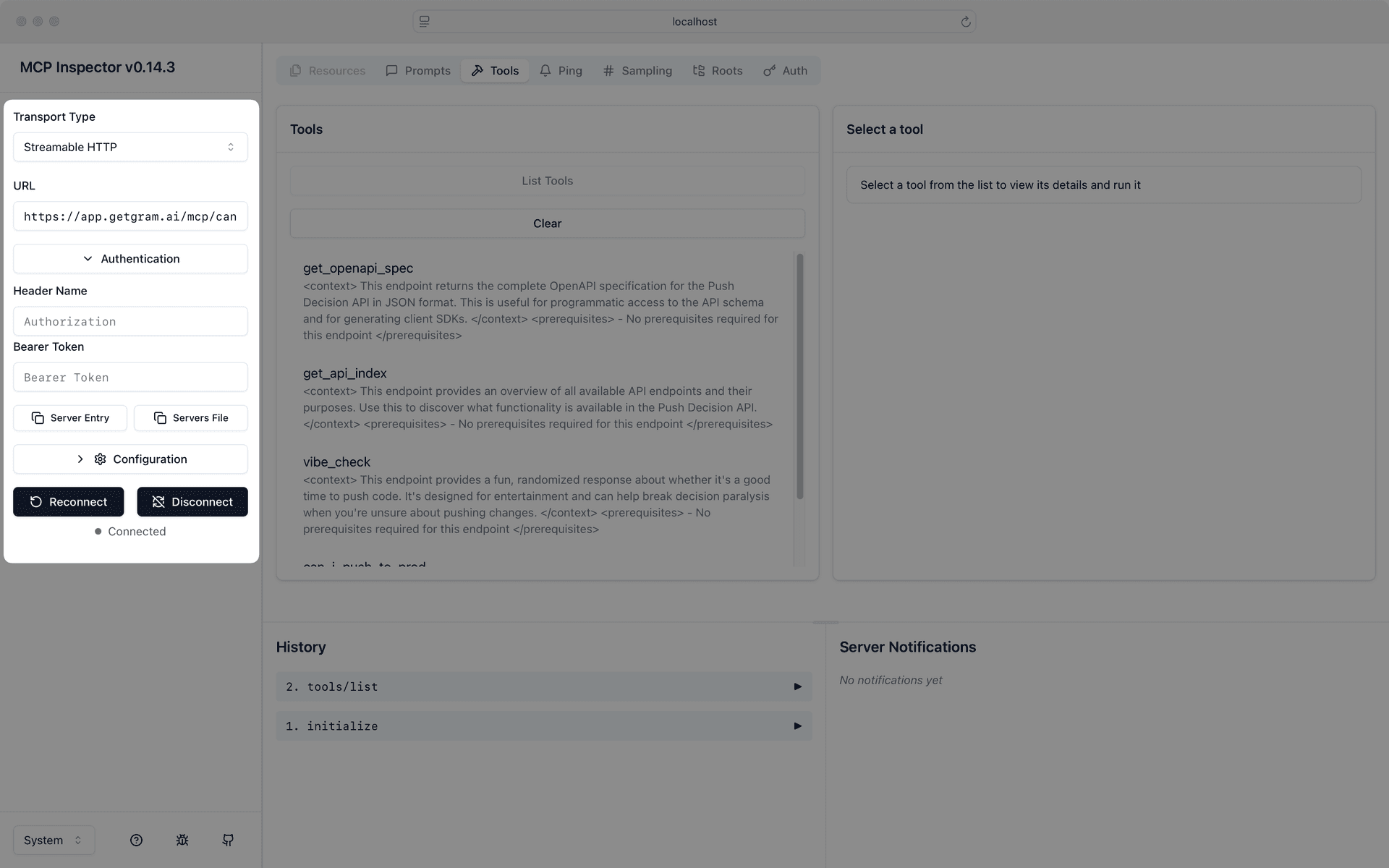
Use the Inspector to verify that your MCP server responds correctly before integrating it with your LangChain application.
Debug tool discovery
You can debug which tools are available from your MCP server:
import asyncio
from langchain_mcp_adapters.client import MultiServerMCPClient

async def list_tools():
    client = MultiServerMCPClient(
        {
            "gram-pushadvisor": {
                "url": "https://app.getgram.ai/mcp/canipushtoprod",
                "transport": "streamable_http",
            }
        }
    )

    tools = await client.get_tools()

    print("Available tools:")
    for tool in tools:
        print(f"- {tool.name}: {tool.description}")
        print(f"  Input schema: {tool.input_schema}")

asyncio.run(list_tools())
Environment setup
Ensure your environment variables are properly configured:
# .env file
OPENAI_API_KEY=your-openai-api-key-here
ANTHROPIC_API_KEY=your-anthropic-api-key-here  # If using Anthropic
GRAM_API_KEY=your-gram-api-key-here  # For authenticated servers
Then load them in your application:
import os
from dotenv import load_dotenv

load_dotenv()
What’s next
You now have LangChain and LangGraph connected to your Gram-hosted MCP server, giving your agents and workflows access to your custom APIs and tools.
LangChain’s powerful abstractions for agents, chains, and workflows, combined with MCP tools, enable you to build sophisticated AI applications that can interact with your infrastructure.
Ready to build your own MCP server? Try Gram today and see how easy it is to turn any API into agent-ready tools that work with LangChain and all major AI frameworks.
Last updated on